
Lesson 1
What and where?
A first launch, boxed and labelled. What usually stops somebody with a new DAW is not that the ideas are hard, it is that they have no names for the things on screen, so every explanation they read is about parts they cannot find.
Two halves
Before any of the names, the single most useful thing to see about this window is that it splits in two, and the split is not decorative.
The bar across the top holds controls. Nothing up there contains any part of your project: it is the row of things you press, plus a readout telling you where the playhead is and how the master output is doing. You could hide the whole strip and lose no music.
Everything below it is your project, shown three different ways at once. The tree on the left names what is in it. The timeline in the middle places the same material in time. The lattice down the right shows what it is doing harmonically. Those are three views onto one thing, not three separate things, and that is the idea the rest of this course is built on.
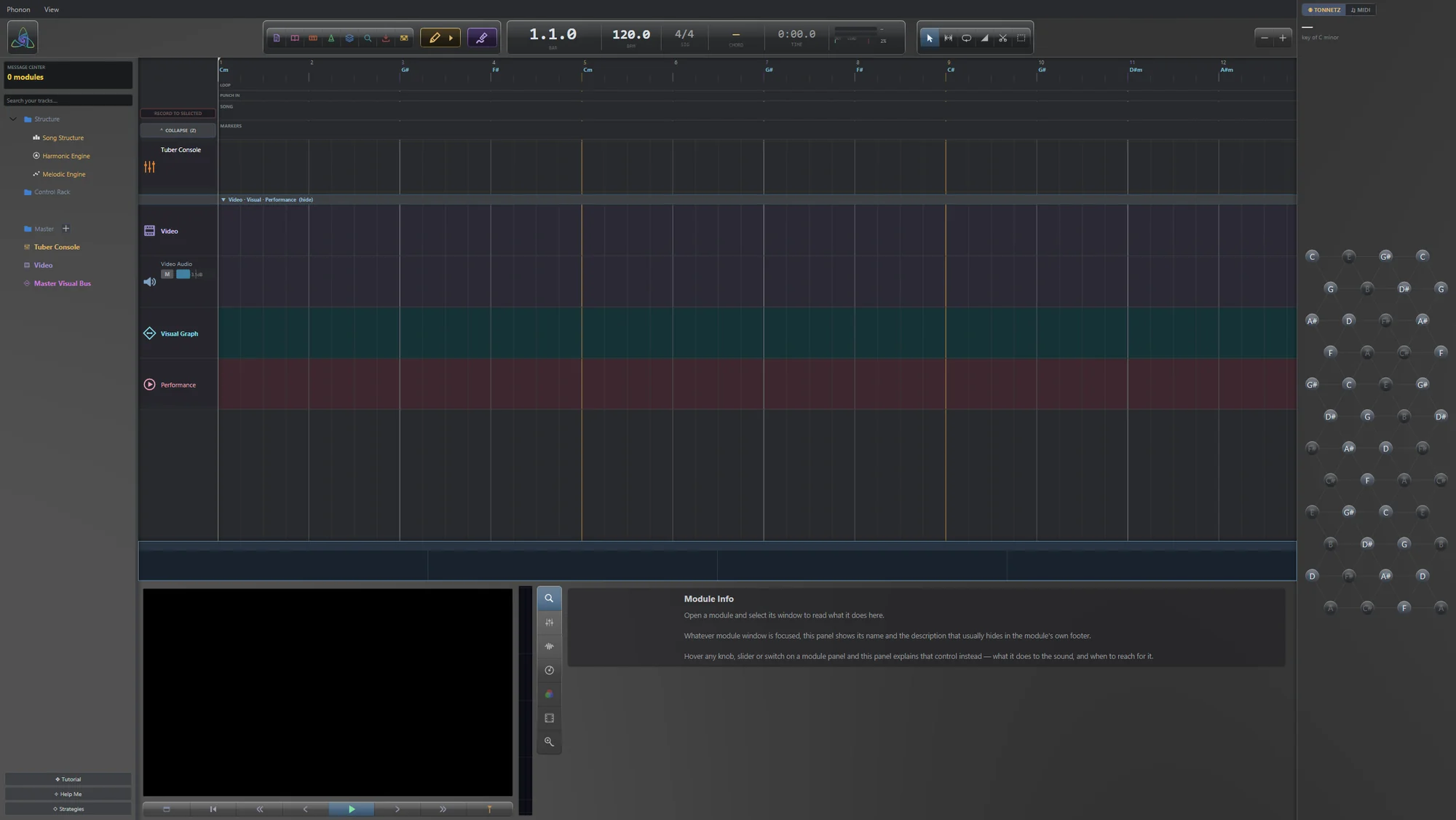
14 panels, boxed
Point at one in the picture to read what it does, or pick it from the list below. The two groups are the window's two halves: the things you press, and the places your project lives. Nothing in the picture is staged, and nothing has been tidied up for the photograph.
The bar across the top
Controls. Nothing up here holds any part of your project - it is the row of things you press, plus the readout that tells you where the playhead is.
The room below it
Your project. Everything down here is a view onto the same material - the tree names it, the timeline places it in time, and the lattice on the right shows what it is doing harmonically.
Three things worth noticing
The project is not empty, even though nothing has been made. A new project arrives with a Structure folder already holding a song structure, a harmonic engine and a melodic engine, plus a control rack and a master. That is why the Tonnetz on the right has a chord lit in it before you have played a note: Phonon starts with a harmonic context running, and modules can read it. If you have used other DAWs, this is the first real difference, and it has a course of its own further down the list.
The timeline is empty and the lanes are not. The rows you can see in the arrangement are the tracks a new project starts with, waiting for material. No regions have been left there for the screenshot.
The black rectangle at the bottom left is not a fault. It is the video preview, black because there is no video yet. Phonon is an audio-visual application and the picture keeps a permanent seat in the drawer whether or not you are using it.
Your window may have fewer panels
Four of the things boxed above can be switched off, and one of them is off in the picture. Under View you will find the Tonnetz sidebar, a history sidebar, and the track headers, each with a shortcut: Ctrl+Shift+H, Ctrl+H and H. The history sidebar is closed here, which is its default. The Tonnetz is open, which is also its default.
So a window that looks slightly different from this one is not necessarily a different version. It is worth knowing early, because the alternative is spending ten minutes looking for a panel that somebody has toggled off.
The one shortcut worth taking away from this lesson is Ctrl+T, which is command search. It lists every command in the application by name and runs the one you pick, and each result shows its own keyboard shortcut beside it. It is the fastest way out of not being able to find something, and it teaches you the shortcut you needed on the way past.
Why it is laid out this way
Left to right, the window runs from what exists to when it happens to what it means harmonically. The tree is a list of objects with no time in it at all. The timeline is the same objects placed against bars. The lattice has no time and no objects, only the harmony they add up to at this instant.
The drawer is the exception, and it is at the bottom because it is about the sound rather than the arrangement: the mixer, the analysers, and the pane that explains whichever module you are looking at. You pull it up when you want to know what the audio is doing and push it down when you want the bars back.