
Lesson 3
Regions
A region is a block on a track with a start and a length, and it is the thing you spend most of your time moving around. The useful part is what it is not: almost nothing you do to a region changes the material inside it.
Everything is in beats
A region has a start and a length, and both are measured in beats. Not seconds, not bars, not samples. That is worth knowing early because it is the reason changing the tempo moves the whole arrangement together instead of pulling it apart: nothing on the timeline is stored in a unit that tempo can invalidate.
Here is a track of each kind with something on it.
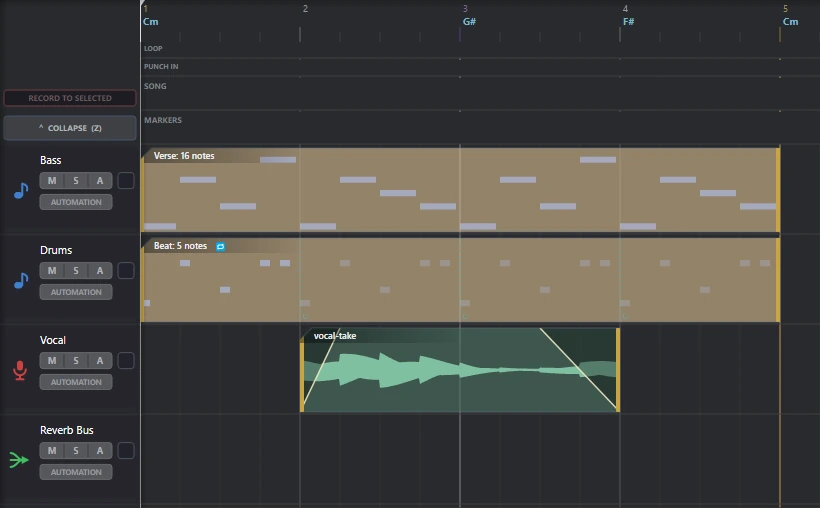
Three regions and an empty bus lane. The ruler above them carries bar numbers and the chord the harmonic engine is holding at that point.
A region is instructions, not a copy
This is the idea the rest of the lesson hangs on. When you trim a region, nothing is deleted. When you stretch one, no audio is rewritten. When you transpose a MIDI region, the notes are not moved.
All of those are stored on the region and applied while it plays. Trimming the start of an audio region sets an offset into the file. Stretching sets a playback rate, with a separate switch for whether the pitch should follow. Reversing sets a flag. Transposing sets a number of semitones. Quantising keeps the original positions alongside the new ones.
The practical consequences are worth spelling out, because they are not what a lot of editing experience will have taught you:
- Trimming is reversible by dragging the edge back out. The material beyond the edge was hidden, not removed.
- Slicing a region in two costs nothing. Both halves are windows onto the same material.
- There is no bounce-before-you-edit step, and no separate destructive mode to be careful of.
The most overloaded gesture in the application
Drag the right-hand edge of a region. That single gesture has four different meanings, and which one you get depends entirely on which tool is lit in the top bar.
The remaining two tools do not touch edges at all. Slice cuts a region in two where you click, and Automation Select drags a box around automation nodes and deliberately does nothing else while it is armed, so you cannot nudge a region by accident while picking up a handful of points.
If a drag ever does something you did not expect, the tool is the first thing to check rather than the last. There is nothing in the appearance of a region that says which tool is armed, and there cannot be: the tool is a property of the pointer, not of the block you are pointing at.
A loop is a second length
This one catches people. A region has a length, and it can separately have a loop length, and they are different numbers.
The Drums region in the picture above is four bars long and loops every one, which is why the same figure appears four times inside a single block. Nothing was copied to make that happen and there are not four regions there. Dragging the region longer with the loop tool gives you more repeats; dragging it shorter gives you fewer, and the loop length itself is untouched either way.
Two kinds, one idea
A MIDI region carries notes. An audio region carries a window onto a sound file. They are separate things inside Phonon and they do not share code, but they were built to the same shape, and the places that matters are the places you can feel.
Both measure position and length in beats. Both take fades in beats, deliberately using the same law, so a one-beat fade sounds like a one-beat fade whichever kind of region it is on. Both are moved, trimmed, sliced and looped with the same tools and the same gestures.
Where they differ is what the extra controls are for. An audio region has a playback rate, a reverse, warp markers and a sample offset. A MIDI region has transpose, velocity, and the option to follow the harmonic engine's chord rather than sounding the notes as written. That last one is not a small feature and it gets its own course.
A detail that saves confusion later: a region with no name of its own displays the track's name, and that is a live fallback rather than a copy taken when the region was made. Rename the track and every unnamed region on it follows. Name a region and it stops following, which is exactly what naming one should mean.