An accessibility helperHow it starts

The Aphelion Natural Language Interface

ANLI

Say what you want. Then listen.

An AI assistant on your computer that speaks MCP (the Model Context Protocol), such as Claude, drives the Aphelion plug-ins running in your DAW. It turns their controls by name, writes their patterns, and reads any value back to you as text.

Windows In Dropforge, Turbofan and TitanframeNot downloadable yet

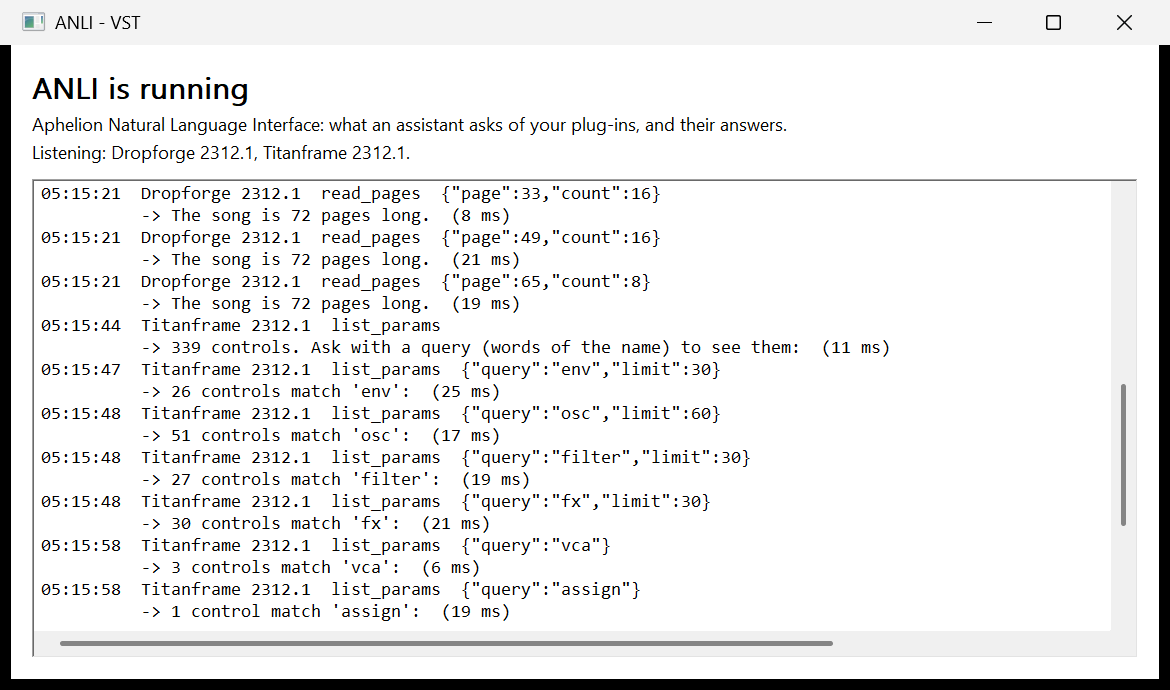
The ANLI window on Windows. Its header says ANLI is running, Aphelion Natural Language Interface: what an assistant asks of your plug-ins, and their answers, and names the plug-ins listening, Dropforge 2312.1 and Titanframe 2312.1. Beneath is the log: an assistant reads Dropforge's song from page 33 to page 72, sixteen pages at a time, each answered in milliseconds, then looks through Titanframe's 339 controls by the words env, osc, filter, fx, vca and assign.

The ANLI window, captured as it ran and not retouched. It opens at an assistant's first command, names the plug-ins listening, and logs every command and its answer. Here an assistant reads Dropforge's song and looks through Titanframe's controls. The plug-ins show as numbers because the DAW gave their tracks no names.

The window as text
ANLI is running
Aphelion Natural Language Interface: what an assistant asks of your plug-ins, and their answers.
Listening: Dropforge 2312.1, Titanframe 2312.1.

05:15:21  Dropforge 2312.1  read_pages  {"page":33,"count":16}
          -> The song is 72 pages long.  (8 ms)
05:15:21  Dropforge 2312.1  read_pages  {"page":49,"count":16}
          -> The song is 72 pages long.  (21 ms)
05:15:21  Dropforge 2312.1  read_pages  {"page":65,"count":8}
          -> The song is 72 pages long.  (19 ms)
05:15:44  Titanframe 2312.1  list_params
          -> 339 controls. Ask with a query (words of the name) to see them:  (11 ms)
05:15:47  Titanframe 2312.1  list_params  {"query":"env","limit":30}
          -> 26 controls match 'env':  (25 ms)
05:15:48  Titanframe 2312.1  list_params  {"query":"osc","limit":60}
          -> 51 controls match 'osc':  (17 ms)
05:15:48  Titanframe 2312.1  list_params  {"query":"filter","limit":30}
          -> 27 controls match 'filter':  (19 ms)
05:15:48  Titanframe 2312.1  list_params  {"query":"fx","limit":30}
          -> 30 controls match 'fx':  (21 ms)
05:15:58  Titanframe 2312.1  list_params  {"query":"vca"}
          -> 3 controls match 'vca':  (6 ms)
05:15:58  Titanframe 2312.1  list_params  {"query":"assign"}
          -> 1 control match 'assign':  (19 ms)

What it is for

If a panel is hard to see, hard to reach or hard to learn, ask for what you want in plain words. Your assistant sets it, and tells you in text what it did.

Who it helps

Every control, by name.

ANLI doesn't replace the panel. It is another way in, for when the panel is in the way.

SEEING THE PANEL

A panel a screen reader can't read.

The panels are drawn pixels, and a screen reader finds no words in them. With ANLI, a blind or low-vision musician can ask what a control is set to, set it by name, and have a pattern read back as text.

SMALL LETTERING

Values as text, at your size.

In the beta, "hard to read" was one of the things we heard most about the panels' small lettering. Ask, and the value comes back as text in your assistant, at the size you read everything else.

HANDS

Nothing small to drag.

Dragging a small knob, or placing steps a sixty-fourth of a bar apart, asks a lot of a hand and a mouse. With a motor impairment or RSI, describe it instead, typed or spoken through your computer's own dictation.

FINDING IT

One control among hundreds.

Titanframe alone has hundreds. Ask for the one you mean by the words of its name, "filter cutoff" or "seq swing", and learn where it stands before you change it. The learning curve is shorter when you can ask.

BIG EDITS

A big edit, in one sentence.

Copy four bars over the next four, clear a page, lengthen a sound's release: what takes a run of clicks and drags on the panel is one request, and "undo that" takes it back.

YOU LISTEN

It can't hear. You can.

Your assistant reads and writes settings and notes; it never hears the result. Whether it sounds right is yours to judge, and if it doesn't, say so, or say undo.

Example commands

Say it the way you'd say it.

There is no command language to learn. These are the kind of thing you can say, and what the plug-in does with each.

  • “Write a four-on-the-floor kick with off-beat hats on page 1.”

    DropforgeWrites the KICK and hat lanes onto the song's first page.

  • “Copy pages 1-4 to 5-8 and put a fill at the end of bar 8.”

    DropforgeCopies four pages over the next four, then writes the last beat of page 8.

  • “Load this kick.wav into Turbofan's bay 1 and play it on every beat.”

    TurbofanLoads the file into a sample of bay 1 and writes a hit on each beat.

  • “Load a pad preset in Titanframe and make the release longer.”

    TitanframeFinds a PAD in the bank, loads it, and turns the release up.

  • “Write a two-bar C minor arpeggio into Titanframe's roll and make the last note brighter.”

    TitanframeWrites the notes into the ROLL and gives the last one a cutoff of its own.

  • “Program a 16-step bassline in the sequencer.”

    TitanframeWrites the steps into the sequencer and sets it to play sixteen.

  • “What is the filter cutoff set to?”

    Any of the threeReads the value back as text, with its unit.

  • “Undo that.”

    Any of the threeTakes back the last change, up to 50 back.

The plug-ins

Three answer today.

Each has an AGENT PORT key on its panel. It is off until you click it, and each plug-in remembers its own.

How it works

Your hands stay on it.

A small bridge program carries your assistant's requests to the plug-ins, and their answers back. Every change is logged as it happens, and the last 50 can be undone.

  • Off until you switch it on.

    A plug-in answers only once its AGENT PORT key is lit. The switch covers every copy of that plug-in, and is remembered.

  • On your computer.

    The bridge reaches each plug-in through a local pipe that only your own programs can open.

  • Like turning a knob.

    Every change is made the way the panel makes it. A control turns through your DAW, so it can be recorded as automation, and everything is saved with your session.

  • Fifty steps back.

    Each plug-in's undo takes back the assistant's changes, up to 50 of them.

  • Every command on screen.

    The ANLI window logs each command and its answer as it happens, and never takes the focus from your DAW.

Availability

On Windows, not downloadable yet.

ANLI works today in Dropforge, Turbofan and Titanframe on Windows. The bridge program has no installer yet, so there is nothing to download; this page will say when there is. The Mac comes later.

When it ships, starting takes three steps:

  1. Turn on AGENT PORT

    Click the key on the plug-in's panel. Its light shows the port is open.

  2. Tell your assistant where the bridge is

    Once, in your assistant's settings, the way any MCP tool is added.

  3. Ask, in plain words

    Then listen, and judge.