
Lesson 5
The drawer
The strip along the bottom is seven pages sharing one space, plus three things that never move. It is where you go to find out what the sound is doing, as opposed to where you go to change what it is.
One column, seven pages
The narrow strip of buttons in the middle of the drawer is the whole navigation. Press one and the right-hand side changes; everything to the left of it stays exactly where it was.
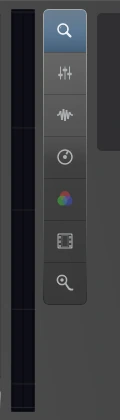
Names and explains whichever module window is focused, and explains any control you hover. The page it opens on.
A channel per track and bus, with the master on the end. Where levels, pan, mute and solo live.
What the audio is actually doing, measured rather than guessed at.
The master chain: what everything passes through on its way out.
The same idea on the picture side.
And the master chain for video.
LFOs, envelopes and CV sources, whose outputs you patch onto any knob in the application.
The numbers are not decoration. Pressing 1 to 7 opens the corresponding page, and opens the drawer first if it was shut.
There is one more button below the others, separated by a gap, and it is not a page at all. It switches the application into performance mode, which takes over the whole window. It sits in the column because that is where your hand already is, but a gap above it is the only warning you get that it does something categorically different from its neighbours.
The mixer, as an example of a page
The mixer is the page most people open first and leave open, so it is worth seeing what a page looks like once the column has switched to it.
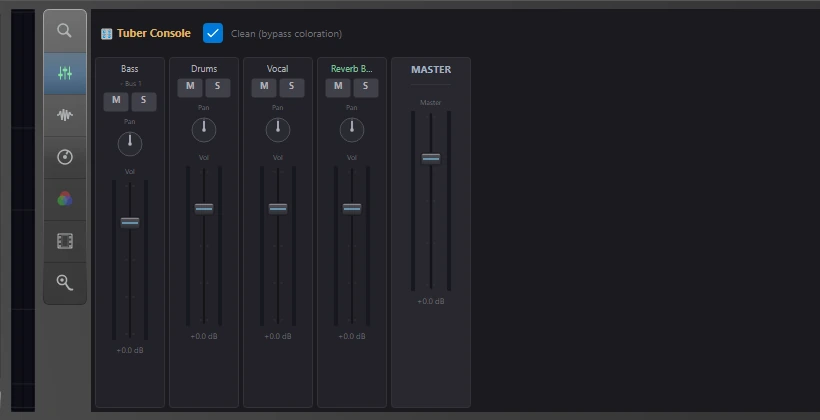
The example project from lesson 2, as channels. Under the Bass channel's name it says Bus 1, which is the send from that lesson, showing up here as a routing label.
Everything in the tree that carries audio gets a strip, tracks and buses alike, in the order the tree has them, with the master on the end. That is the same list you have been looking at since lesson 2, drawn as faders instead of rows, and it is worth noticing that nothing new was created to make the mixer exist.
What never moves
To the left of the column are three things that no page can replace: the video preview, a transport bar, and a level meter.
The preview is black until there is video, and it is permanent because Phonon is an audio-visual application rather than an audio one with a video feature bolted on. The transport bar is a second place to start and stop, right where your pointer already is if you have been working in the drawer. The meter is the master output, the same signal the readout in the top bar is metering.
Dragging it
The drawer's top edge is a grip. Drag it up for more room and down to tuck it away, and the song overview strip stays put above it either way, so hiding the drawer does not cost you the map of the arrangement.
The drawer does not resize its contents as you drag. It keeps its full height and is cropped by the window instead, which is why the drag stays smooth: the views inside are laid out once rather than on every frame of the gesture. It is worth knowing only because it explains why the contents appear to slide behind the edge rather than squash.