
Lesson 3
The lattice
The panel down the right-hand side of the window is not a decoration and it is not a spectrum analyser. It is a map of note relationships, with your progression walking across it.
Where it is
The Tonnetz sidebar occupies the right-hand dock and is open when you first launch Phonon. Toggle it with Ctrl+Shift+H. It has two tabs, and the lattice is the one it opens on.
At the top it names the chord being played and, under it, the key the engine has inferred. Everything below that is the map.
What the shapes mean
Every circle is a note. The grid is arranged so that neighbouring notes are consonant with each other, which has one very useful consequence: a triad is a triangle, and the three notes of any chord are always next to each other rather than scattered.
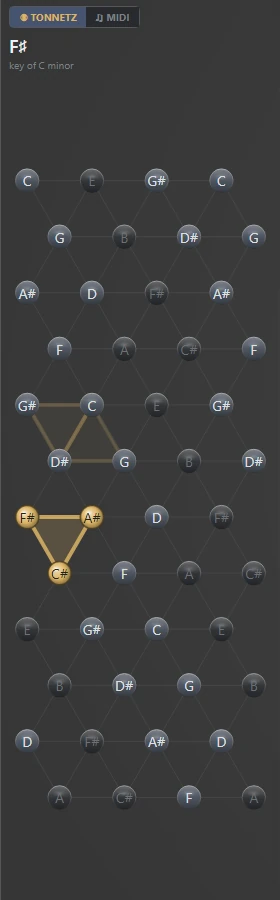
One triad. Every vertex it touches is a note in the chord you are hearing right now.
A major triad. Two of its notes sit on the upper row and one below.
A minor triad. One note above, two below. The same three-note shape, flipped.
A note two chords have in common. Chords that share notes are drawn touching, which is the entire point of the picture.
Where you just came from. The trail dims by how many chords ago, not by how long ago.
Reading the one above
The bright triangle is F sharp major, the chord sounding at the moment the picture was taken, and it points down as every major triad does.
The faint pair above it is the two chords before it, and they are worth looking at properly, because they are doing the thing the lattice exists to show. One is G sharp major, pointing down. The other is C minor, pointing up. They are drawn joined along an edge, and that edge is two notes those chords have in common - C and D sharp belong to both.
No chord list will tell you that. Here it is simply the shape: a move that pivots on shared notes touches, and a move that abandons everything lands somewhere else on the grid entirely. When a progression sounds smooth, this is usually what it looks like.
The trail is counted, not timed
Previous chords fade out over the last few, and the fade is by how many chords ago rather than how many seconds.
That distinction matters more than it sounds. Tied to a clock, a trail on a slow piece would be gone before the next chord arrived and a fast one would smear into an unreadable mess. Counted instead, the picture shows the same amount of history whatever the tempo.
The other tab
MIDI switches the sidebar to a falling view of the notes actually being played, rather than the harmony they are drawn from. The lattice tells you what the chord is; that tells you what is landing on it.