
Lesson 1
The module browser
Several hundred modules is a good problem and still a problem. The browser is built around that: it will let you search when you know what you want, browse when you do not, and hear one before you commit to it.
Two ways in
Right-click a track and choose Add Module. The first entry is Search Modules, and below it the whole catalogue arranged by category.
Use the search when you know the name, or half of it. Browse the categories when you know the sort of thing you want and not which one: the categories are the shape of the catalogue, and reading down one is how you find out what exists.
Generators have their own entry, Add Generator, because they do a different job. They write parts rather than make sound, and that is a course of its own.
What a row tells you
Every entry carries more than a name, and none of it is decoration.
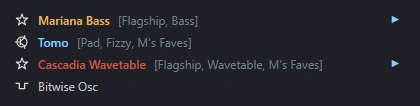
Four real rows, at the size the menu draws them.
On the left is the category icon, the same mark the hierarchy uses for that kind of module. After the name come its tags in brackets: what it is for, roughly, in a word or two.
The colour of the name is a shelf:
A flagship. The one to reach for first in its category, and pinned to the top of it above a line.
A favourite of the person who built Phonon. Not a claim that it is better, only that they keep using it.
Both at once.
Everything else, which is most of the catalogue and includes a great deal worth having.
Hearing one before you load it
Some rows have a ▶ at the right-hand end. Press it and you hear that module, without adding it to anything and without closing the menu.
What plays is a short recording of the module rather than the module itself, which is why it starts instantly. It is a real one: the same clips the website plays, rendered from the module by the same code that would run if you loaded it. The rows without a triangle are the ones no clip has been made for yet.
Hovering a row can also bring up a tip: a line about what to do with that module, rather than what it is. The description in the browser already says what it is, so the tip is spent on something else, usually a module it goes well with or the control to touch first.
Two things the ordering is doing
Flagships come first. Inside a category the flagships are pinned to the top with a line under them, so the first few entries in a long list are the ones to start with rather than whichever happened to be written first.
Some categories nest. Drums are grouped by family, and every category can have a Legacy submenu at the bottom holding modules that something newer has since covered. They still work and projects that use them still load; they are one level down because there is usually a better answer above.